See the FBA and FBM profit on the product page you are already looking at.
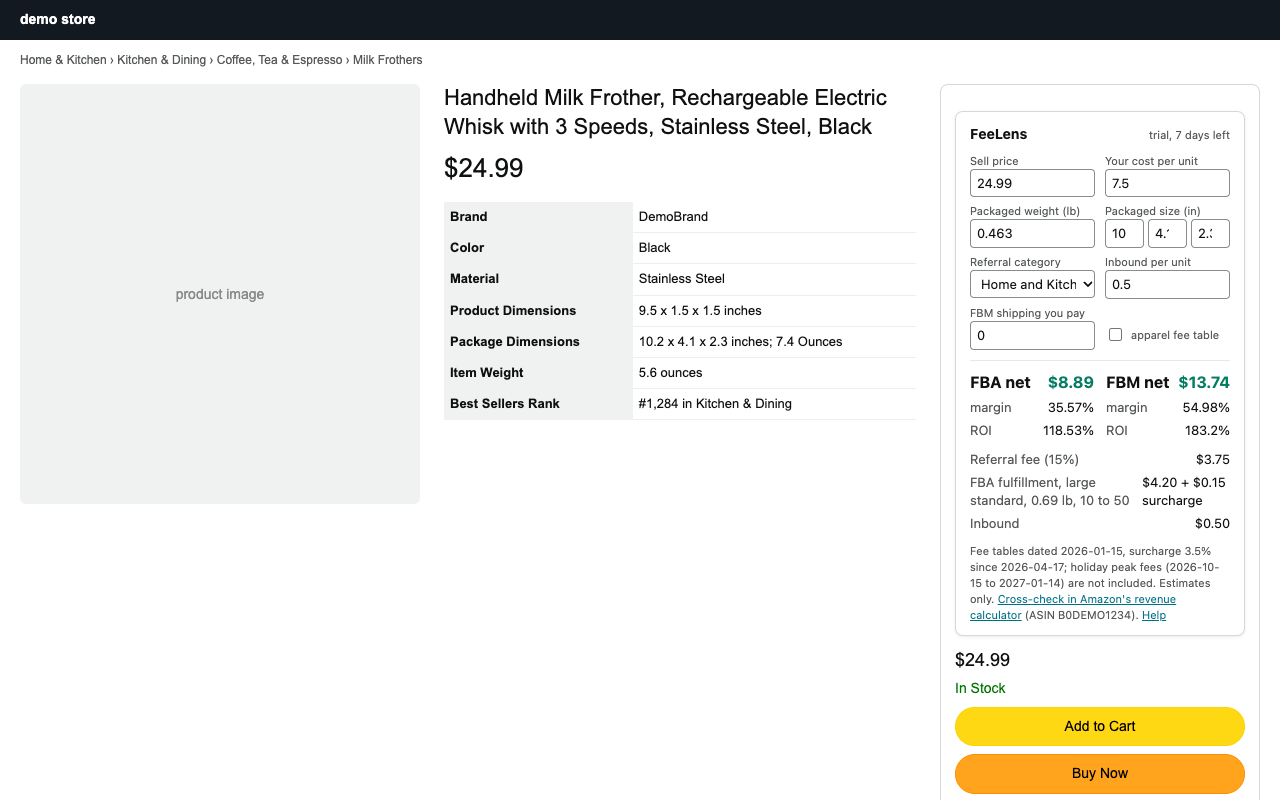
FeeLens reads the price, package weight and size from the Amazon.com product page, applies the published 2026 referral and fulfillment fee tables, and shows net profit, margin and ROI for FBA and FBM. You type your cost; the fee math runs in your browser.
How it works
1. Open a product
On any Amazon.com product page the panel appears above the buy box with the price, packaged weight and dimensions already filled in from the page.
2. Type your cost
Enter what a unit costs you, inbound shipping per unit, and the category if the guess is wrong. Edit the packaged weight if the listing is missing it; the outbound box is what Amazon bills.
3. Read the numbers
Referral fee, FBA fulfillment fee with the current surcharge, FBA and FBM net, margin and ROI. Your inputs are remembered per product, in your browser only.
What is different
The fee table carries its date
Every estimate says which fee table it used and when that table took effect. Amazon changes fees; you should know which version you are looking at.
Packaged weight, not item weight
Amazon bills on the packaged outbound weight and size. FeeLens prefers the package dimensions on the page and lets you correct them.
No account, no bundle
There is nothing to sign up for and no seller API to connect. One job: the profit on this unit.
A cross-check link on every estimate
One click opens Amazon's own revenue calculator so you can confirm before you order inventory.
Pricing
Checkout and tax are handled by Polar, the merchant of record. Cancel any time from the receipt email.
Support
Most questions are answered right away from the docs. Anything else reaches a person.